The Flutter missing link: Why full-stack Dart changes everything
With Cloud Functions for Firebase support for Dart, we can treat the entire stack as a single, unified application.


For years, Flutter developers have inhabited a divided architectural reality. You build a high-performance, beautiful frontend using Dart, leveraging its sound type system and expressive syntax. But the moment you need to extend that logic to the cloud, you’re forced into a "language mismatch." Suddenly, you’re context-switching into TypeScript, Go, or Python—juggling different concurrency models and manually porting your data structures. This friction isn't just an inconvenience; it imposes the "Double-Doc Tax," a significant overhead where teams must synchronize logic and documentation twice, effectively robbing the project of valuable building time.
With the announcement of experimental support for Dart in Cloud Functions for Firebase, that era of architectural friction is coming to an end. For the first time, we can treat the entire stack as a single, unified application.
One language to rule them all
#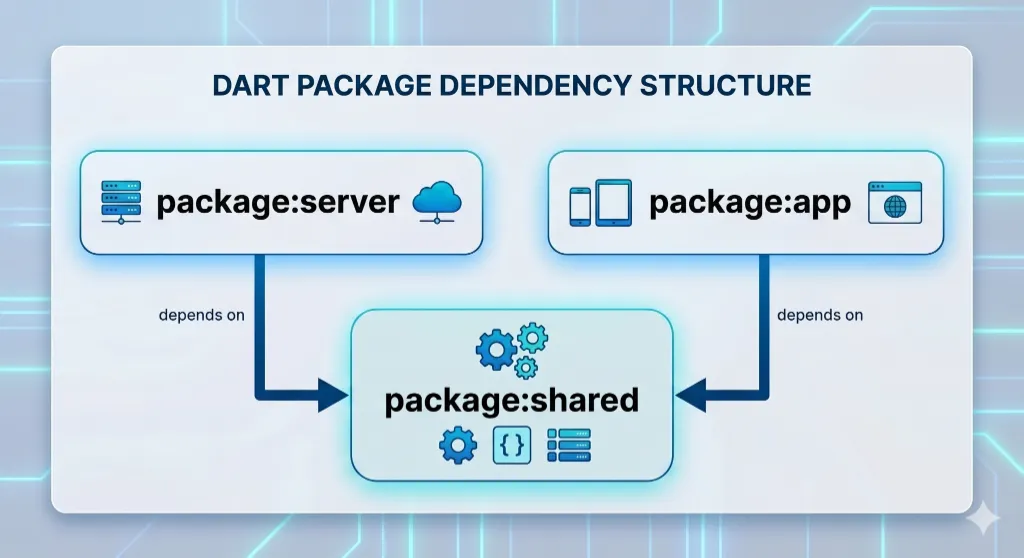
The most transformative aspect of this shift is the "Shared Package" pattern. By moving your business logic and data models into a standalone Dart package, you eliminate the manual duplication that plagues traditional stacks. When you update a field in your shared package, that change propagates instantly across the entire stack. This architecture ensures that validation rules are identical on both the client and server, removing the errors inherent in cross-language implementation.
By sharing data models and validation rules in a common Dart package, you can ensure your frontend and backend stay synchronized.
Eliminating the "Double-Doc Tax" is a major productivity win.
By using the
firebase_functions
package and sharing your models,
you stop wasting time syncing teams and start building features.
Performance without the "warm-up"
#In a serverless, "Scale-to-Zero" environment, performance is defined by your cloud function cold starts. Traditional runtimes like Node.js or Java often require a heavy virtual machine or a Just-In-Time (JIT) warm-up period. Dart changes the equation through Ahead-of-Time (AOT) compilation. By compiling directly into lean, native binaries, Dart functions spring to life fast.
While a traditional SDK footprint might sit at 211 MB, a native Dart binary can be as small as 10 MB. Because Dart utilizes an asynchronous, event-driven architecture, it handles I/O-bound serverless tasks—like database queries and API requests—with extreme efficiency, without the overhead of large thread pools.
Dart binaries execute immediately without a warm-up period - as fast as 10 milliseconds.
Containers are now optional
#One of the greatest hurdles for mobile developers moving to the backend has been the infrastructure tax of writing Dockerfiles, managing container registries, and configuring Linux environments. The Firebase CLI now abstracts this complexity entirely. In a single command, the CLI handles the heavy lifting of compilation and deployment to Google Cloud infrastructure.
For power users, there is a hidden 'pro tip'—the Dart toolchain allows for seamless cross-compilation. You can compile a Linux 64-bit binary directly on a Mac or Windows machine, which the CLI then uploads to Cloud Run.
> dart compile exe bin/server.dart --target-arch x64 --target-os linux
Generated: /Users/user1/dart_server/bin/server.exe
> ls -l bin/server.exe
.rwxr-xr-x@ 7.8M user1 15 May 13:00 -I  bin/server.exe
A development loop that actually loops
#The feature Flutter developers value most is "Hot Reload." Native Dart support brings a similar philosophy to the backend with the Firebase Local Emulator Suite. The suite provides a complete offline environment where the backend experience finally feels "native" to the Dart developer.
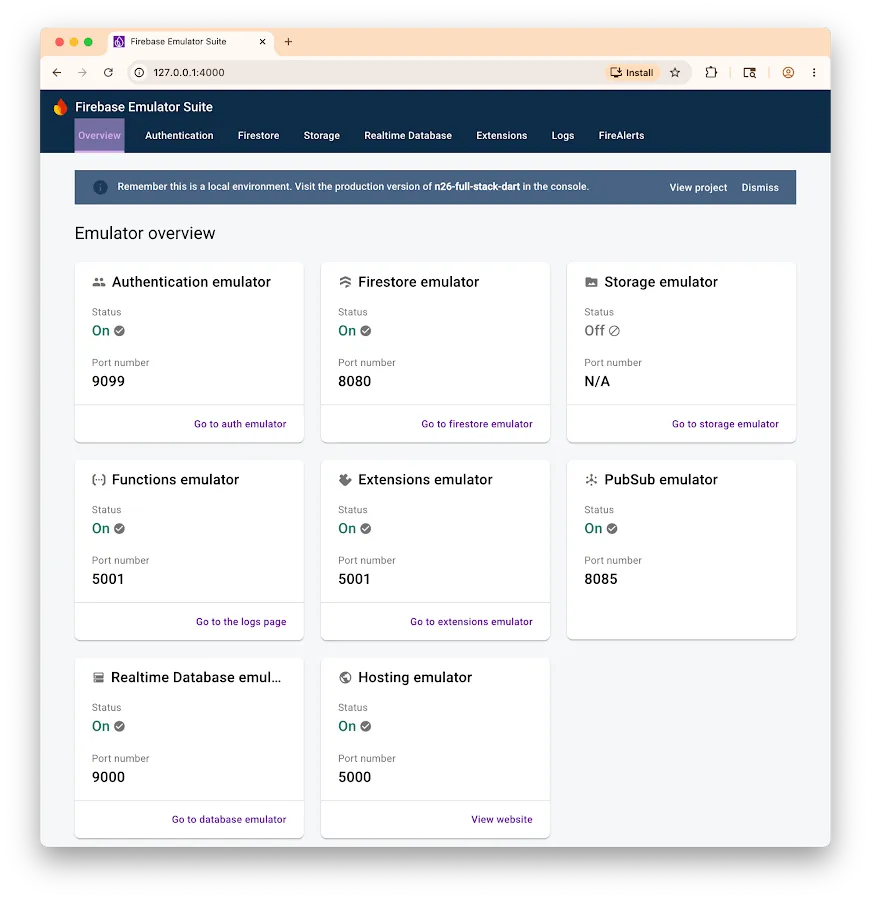
This enables you to test your end-to-end application, including Firestore and Auth interactions, with near-instantaneous feedback before a single line of code reaches production.
The experimental Admin SDK
#The foundation for this work is the new Firebase Admin SDK. While it is automatically initialized within Cloud Functions to provide secure access to services like Firestore, its potential is far greater. Because it is available on pub.dev, it is not tethered solely to "Functions." It is a versatile server-side library that can run on Cloud Run, Compute Engine, or even your local machine. This package is a step in Dart’s evolution into a robust, general-purpose server-side language.
The full-stack future
#While this represents a fundamental shift in the Flutter ecosystem, you should be aware that we are still in the experimental stage. To begin, you must be on Dart SDK 3.9 or higher and Firebase CLI v15.15.0 or higher. Currently, support is focused on HTTPS and callable functions.
Eliminating the division between client and cloud is a major leap forward for development velocity. With a unified stack, you can build end-to-end systems with maximum efficiency, paving the way for a highly productive workflow and unlocking new possibilities for Dart on the server.
To get started with building your first Dart Cloud Functions, check out the Cloud Functions for Firebase documentation. If you would like to deploy a Dart Cloud Function using Cloud Run instead, check out this sample app.
More from Dart

Announcing Genkit Dart 1.0: Build production-ready agentic apps with Dart and Flutter
Announcing the stable 1.0 release of Genkit Dart, an open-source framework for building production-ready agentic apps and AI features in Dart.


Skills CLI 1.0: Bundle and distribute AI agent skills for your packages
Ship official AI agent skills directly with your packages to improve discoverability.