Evolving the Dart REPL PoC
Hacking with Dart


The Dart REPL allows you to evaluate Dart expressions and statements in an interactive shell. It has been awhile since my first post about the Dart REPL (you don’t need to read it to enjoy this post), and lots of features are still missing. In particular, dynamic imports and support for top-level declarations would be very useful, so let’s look into how to support them.
Disclaimer: I do work for Google, but this post is about a personal project. I’m not on the Dart team or related. This article only contains my humble personal opinion.
tl;dr: Code and instructions on how to run the Dart REPL can be found at https://github.com/BlackHC/dart_repl.

Hot reload
#For Flutter, a cool new feature has been added to the Dart VM: hot reload. There is an entertaining YouTube clip from the Dart DevSummit that explains and shows it in detail:
Hot reload allows you to change your code while your program is running. The Dart VM will pick up the changes you’ve made and try to apply them while keeping everything running. And if it can’t, it will tell you why. This is very cool! In the spirit of hacking Dart to do great things, let us ponder how we can use this to implement the new features.
Why can’t we import new libraries in the current version of the REPL?
#The REPL uses Dart’s VM service to evaluate expressions. Sadly, importing a library is not expression in Dart, so we can’t just evaluate it in that context. However, we can change the code of the REPL’s sandbox while it is running to import a new library and then we could just trigger a hot reload to update the REPL. Does this work? It actually does \o/
But wait: another thing that we can’t do by evaluating expressions via the VM service is creating new classes and functions. In fact, none of Dart’s top-level declarations can be executed by evaluating an expression for this reason.
How can we allow top-level declarations?
#Of course, we could use the same idea described above to also add a new class or a global function. However, anyone who has used IPython or similar for a while knows that you tend to redeclare the same class or function frequently as you iterate on the code. You re-execute slightly modified versions of the same code over and over again while you play around with it.
If we were to just add these declarations to our sandbox Dart library, it would require us to keep tab of what has been declared when and where in the file in order to update the declaration when you iterate on it. This requires a lot of logic and clever code. Sadly, it would also break easily if a change to a class were to break compatibility with older code or other declarations. This would keep the REPL from hot reloading and would force the user to restart it :( This sounds complex and brittle: not a winning combination, I think!

Spike & chains
#Instead, what if we could redefine the same top-level declaration multiple times without the redeclarations ever colliding? Is that even possible in Dart? You bet it is! But not within the same library :) Dart allows you to import a library and then declare a class, function or global variable that shadows an existing declaration.
class MyClass {
  static final value = 1;
}
import ‘a.dart’;
class MyClass {
static final value = 10;
}
In this example, there will be no complaints about b.dart’s MyClass shadowing
a.dart’s version because they live in different libraries and the local declaration in b.dart
has precedence over the one imported from a.dart.
In general, shadowing is what happens when you declare a variable that hides another variable from an outer scope. For example:
float a;
void func() {
float a; // This `a` shadows global `a`.
}
Can we use this? To investigate it, I have implemented a quick spike here. It doesn’t generate any code. Rather, it is a very dumb example to make sure that what we think will work actually works. It would be frustrating to spend a lot of time on implementing this using code generation only to find out that it could have never worked! This is the gist of it:
class A {
  int f() => 1;
}
import 'import_1.dart';
export 'import_1.dart';
class A {
int f() => 2;
}
import 'import_2.dart';
void main() {
result = new A().f();
print(result);
}
This works indeed! We can create a chain of libraries that import each other (and also export each other because otherwise the symbols will not be available everywhere). Then the users can redefine symbols as often as they want. Obviously, this can result in old code referring to shadowed symbols, which might make things slightly confusing, but at least it won’t break. And anybody who has used IPython or similar has learnt to live with it, too. It can’t be that bad.
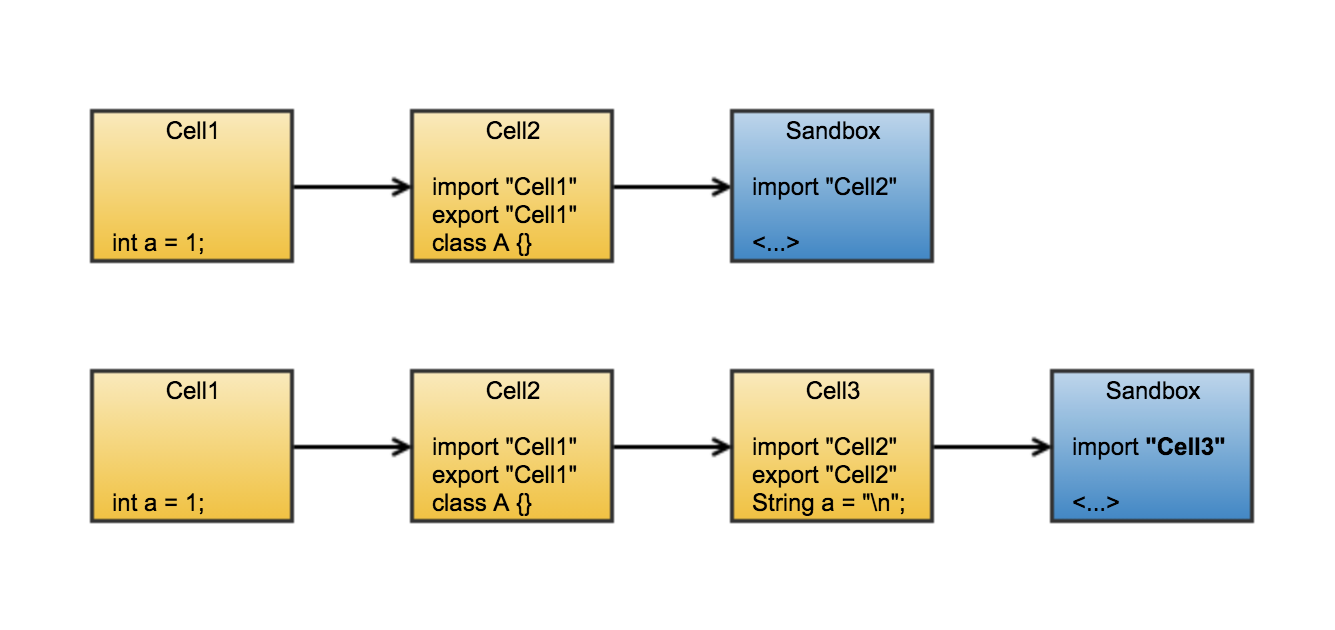
The diagram above shows how it works: as we add new top-level declarations, new “cells” (Dart libraries) are created which import (and export) the previous cell. The final cell is imported in the sandbox library that is used as execution environment for normal Dart expressions and statements. The sandbox file is edited in-place and then reloaded using hot reload.
A workflow vision
#
Moreover, if you want to update code continuously without shadowing anything, that is still possible, too: hot reload already allows for this workflow in normal Dart programs. You can do the same in the REPL. You can edit your amazing Dart library
amazing_dart_library.dart and import it into REPL, play around with it, and while you do so, you can edit the code in your editor of choice and have the REPL hot reload the code when you want by calling
reload(). The best of both worlds \o/
How can we implement this in practice?
#
Well, we are hacking Dart here, so let’s see: Hot reload is not supported by the vm_service_client
yet since it is such a new feature and the service specification
is not totally complete yet. I started writing a pull request
for Natalie (the maintainer) to add support for it, but really, as my coworkers know: production quality code is not my thing, especially not in my spare time (sorry Natalie!). However, this does not block our hacking adventure.
pub, Dart’s package management system, not only supports automatic version constraint resolution and a centralized repository of packages, it also allows you
to use local packages or to depend directly on GitHub
. This is usually not advisable because you lose much of what makes pub great, but here it works: I simply forked
vm_service_client into my own GitHub clone and made the necessary changes. You can find the code at
https://github.com/BlackHC/vm_service_client/tree/reload_sources_poc. Afterwards, I changed the Dart REPL’s
pubspec.yaml to link to my GitHub clone instead of the official version:
[...]
  vm_service_client:
    git:
      url: git://github.com/BlackHC/vm_service_client.git
      ref: reload_sources_poc
[...]
And that’s it! A simplepub getin the terminal now updates the Dart REPL to use the forked version.
This makes it really easy to experiment with anything: you can fork other packages to try things out and easily depend on them. And the cool thing is, I can publish this and when you download the REPL for yourself using pub, it will grab the code from GitHub, too. Very hackable yet shareable! (Even if it’s not advisable for production packages in general :)
The main bit of juicy logic is the cell generator that implements a very simple templating mechanism in line with what we’ve discussed above:
import 'dart:io';
class DartTemplate {
final String content;
DartTemplate(this.content);
void instantiate(String targetPath,
{String source, String library, String imports}) {
final instanceSource = content
.replaceAll('/*{SOURCE}*/', source ?? '')
.replaceAll('/*{IMPORTS}*/', imports ?? '')
.replaceAll('/*{LIBRARY}*/', library ?? '');
new File(targetPath).writeAsStringSync(instanceSource);
//print('wrote $targetPath:\n$instanceSource');
}
}
/// Keeps a chain of temporary cell files that import and re-export each other.
/// This allows us to create top-level cells that contains classes and other
/// top-level decls that can shadow each other.
class TopLevelCellChain {
final DartTemplate cellTemplate;
final String headName;
final String basePath;
int _currentCellIndex = 0;
TopLevelCellChain(this.cellTemplate, this.headName, this.basePath);
String get currentCellPath => '$basePath/$currentCellName';
String get currentCellName => 'cell${_currentCellIndex}.dart';
String get headPath => '$basePath/$headName';
void addCell(String source) {
// Import and export the previous cell.
final imports = _currentCellIndex > 0
? '''
// Import the previous cell and export it to make its symbols available to the
// next cell.
import '$currentCellName';
export '$currentCellName';
'''
: '';
_currentCellIndex++;
cellTemplate.instantiate(currentCellPath, imports: imports, source: source);
// Update the sandbox.
refreshSandboxLibrary();
}
void refreshSandboxLibrary() {
var libraryStatement = '''
/// This library name is needed to find the library using reflection.
library sandbox;
''';
cellTemplate.instantiate(headPath,
imports: _currentCellIndex > 0 ? 'import \'$currentCellName\';' : '',
library: libraryStatement);
}
void undoCell() {
if (_currentCellIndex > 0) {
_currentCellIndex--;
}
refreshSandboxLibrary();
}
}
The hot reload feature is called from the REPL when a new import is needed:
Future linkAndExecuteCell(SandboxIsolate sandboxIsolate, String input,
    VMRunnableIsolate runnableIsolate) async {
  sandboxIsolate.cellChain.addCell(input);
  final report = await runnableIsolate.reloadSources();
  if (!report.status) {
    print(report.message);
    // Undo the last cell, so we can try again.
    sandboxIsolate.cellChain.undoCell();
  }
}
And that’s pretty much it! You can have a look at all the changes in the pull request: https://github.com/BlackHC/dart_repl/pull/2. I admit the code is a bit hacky and untidy. There is also quite a bit of unrelated wrapper code for message passing between the REPL and the sandbox in the pull request. This sadly obfuscates the main changes a bit. I need to see how we can refactor all this to make it neater and tidier again… but sometimes, it’s just easier to get things running quickly than writing the best code and pull requests. Sorry about that!
The Dart REPL’s source can be found at https://github.com/BlackHC/dart_repl. In addition to supporting top-level declarations, I have also added support for built-inimport,
loadPackage and reload commands. (Please note: loadPackage requires the soon-to-be-released 1.24 dev builds of the Dart SDK. It’s a no-op right otherwise.) These built-in commands are all trivial extensions that use hot reload. Finally, to load new packages from your local pub cache, I’m using the excellent
pub_cache package.
To give it a go (and assuming you have installed the Dart SDK), just run:
pub global activate dart_repl
pub global run dart_repl
Thanks for making it to the end of this article! Please let me know what you think :)
Cheers, Andreas
More from Dart

Bringing Primary Constructors to Dart
An inside look at the design decisions, trade-offs, and syntactic sugar behind adding primary constructors to Dart 3.13.


History of JS interop in Dart
Support for Wasm just landed in the current Flutter beta, thanks to an exciting JavaScript interop milestone reached in Dart 3.3. To…
